
Transfer Points using the MyGP App is a feature that many Grameenphone users still don’t know about. In this Priyo Blog guide, we’ll explain how to transfer points, why you should transfer them, and show you the complete step-by-step process to send your GP points to your friends easily.
Assalamu Alaikum wa Rahmatullahi wa Barakatuh. Welcome to Priyo Blog!
Many of us use the MyGP App every day, but we don’t know how to transfer points or even what these points are used for. Whenever you purchase internet packs or selected offers through the MyGP App, you may earn GP Reward Points. However, many users are unaware of how to use these points or how to gift them to friends and family.
In today’s guide, we’ll explain everything you need to know about Transfer Points. You’ll learn what GP points are, why they are useful, who can receive them, and the exact steps to transfer your points successfully. So, let’s get started!
What Is MyGP Transfer Points?
Transfer Points in the MyGP App are reward points that Grameenphone users earn when they purchase eligible internet packs, bundles, or special offers through the MyGP App. Many users receive these points but don’t know what they are, how they work, or how to use them effectively.
With Transfer Points, you can redeem your reward points for:
- SMS Packs
- Voice Minutes
- Internet (MB) Packs
You can also use your reward points for shopping and other eligible offers available in the MyGP App, depending on the promotions currently provided by Grameenphone.
One of the best features of Transfer Points is that you can gift your reward points to your friends and family directly through the MyGP App. If you want to learn how to transfer points step by step, continue reading this guide. The complete process is explained below in a simple and easy-to-follow way.
How to Transfer Points in the MyGP App?
Transfer Points in the MyGP App is a simple and quick process. You don’t need any technical skills to send your GP reward points. If you already use the MyGP App, you can easily transfer your points to eligible friends directly from the app.
If you haven’t installed the MyGP App yet, download it from the Google Play Store or Apple App Store and sign in with your Grameenphone number. New users may also receive promotional welcome offers, such as bonus internet, depending on Grameenphone’s current campaigns.
In the next section of this guide, we’ll show you how to transfer points step by step, so you can send your reward points to your friends quickly and without any confusion.
How to Transfer Points in the MyGP App – Step-by-Step
To transfer points using the MyGP App, first open the app and log in with your Grameenphone number. After logging in, go to the home screen and follow the instructions shown in the screenshots below.
In the first screenshot, tap the option marked with the red box. Once you tap it, a new page will open with additional options. Follow the next screenshot and continue with the remaining steps to complete the Transfer Points process successfully.
Note: The screenshots below are provided to make each step easier to understand.
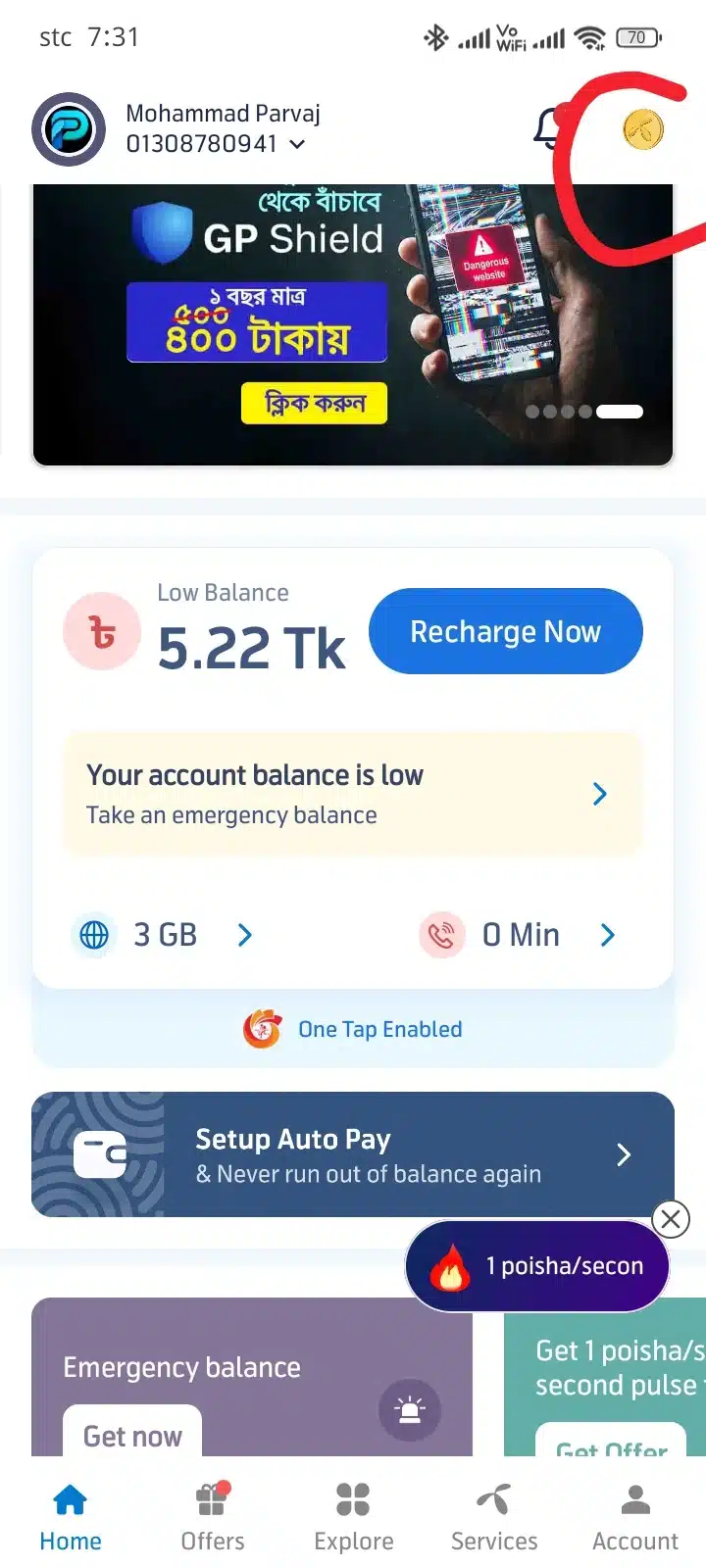
Select the Transfer Points Option
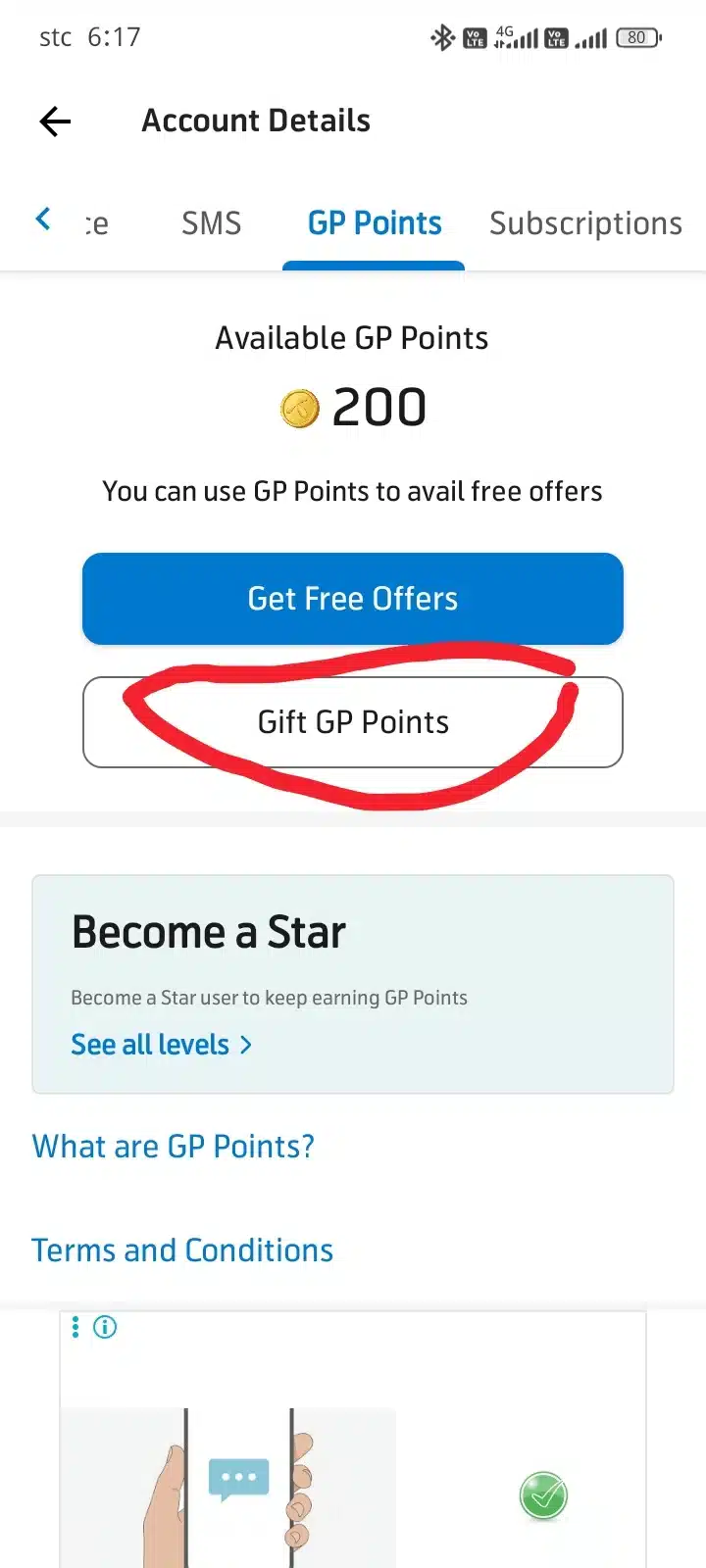
After completing the previous step, your MyGP Reward Points will be displayed on the screen, just like in the screenshot below.
You will notice two available options. To transfer points, simply tap the option highlighted with the red box in the screenshot. This is the official Transfer Points feature that allows you to send your reward points to another eligible MyGP user.
Follow the next step below to continue the Transfer Points process.
Enter the Recipient’s Number and Points
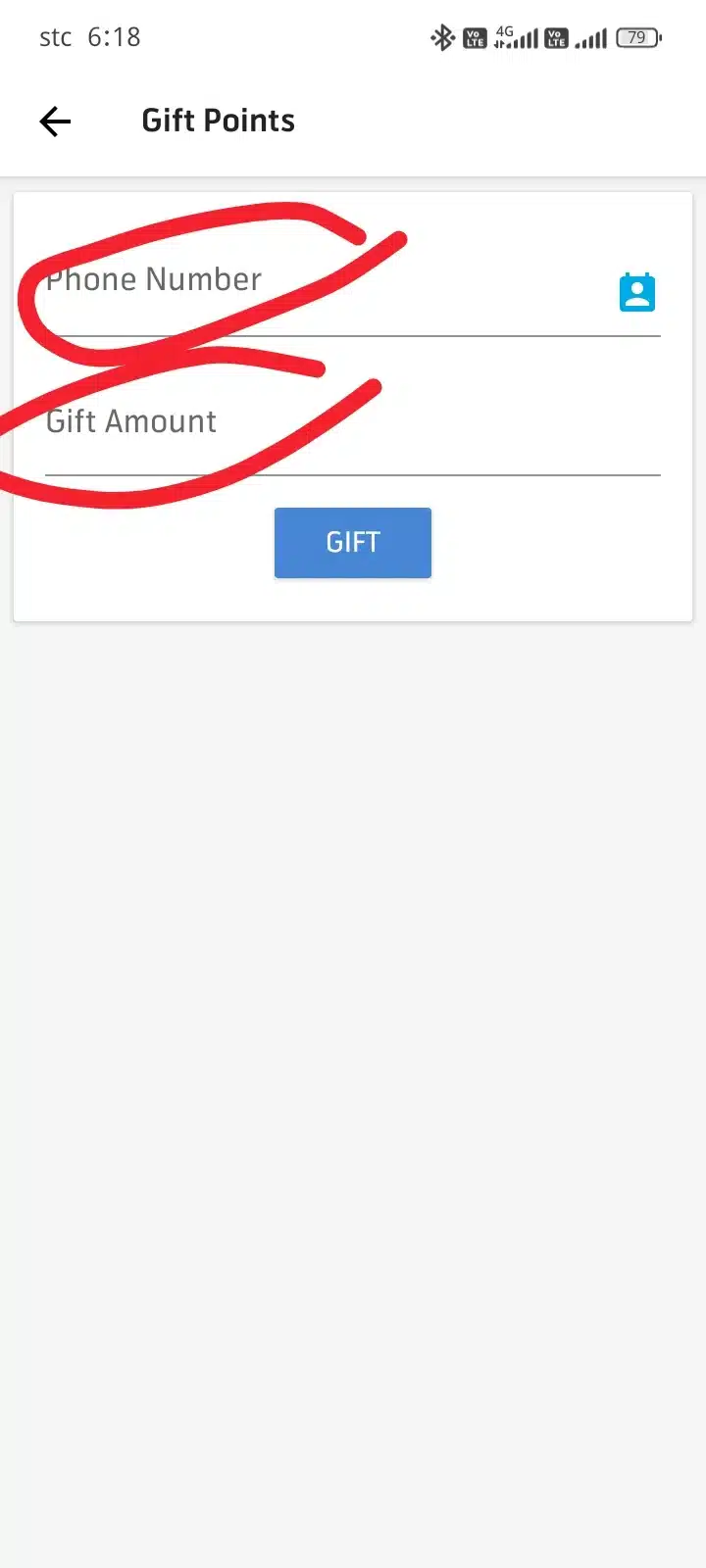
After tapping the Transfer Points option, a new screen will appear, similar to the screenshot below.
On this page, you need to enter the required information to complete the Transfer Points process:
- First Field: Enter the Grameenphone number of the friend or family member you want to send the points to.
- Second Field: Enter the number of reward points you want to transfer.
Once you have filled in both fields correctly, scroll down and proceed to the next step. The following screenshot will show you exactly what to do next to complete the Transfer Points successfully.
Tap the Gift Button to Complete the Transfer
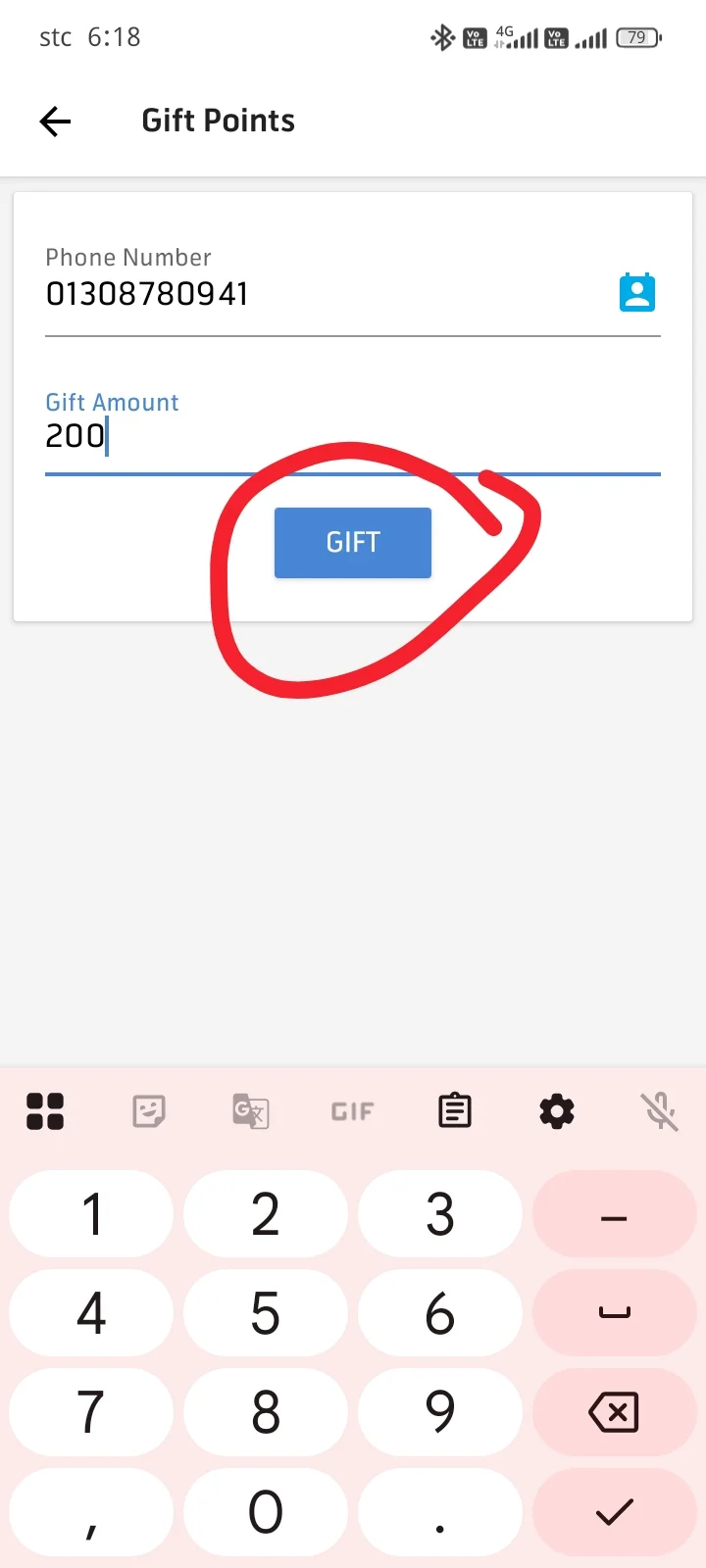
Take a look at the screenshot below. As shown in the example, the required fields have been filled in correctly to help you understand the process more easily.
After entering the recipient’s Grameenphone number and the number of reward points you want to send, simply tap the Gift button highlighted with the red box in the screenshot.
Once you tap the Gift button, the Transfer Points request will be processed, and your reward points will be sent to your friend’s MyGP account instantly (if the transfer is successful and both accounts meet the eligibility requirements).
Transfer Points Successfully
That’s it! Your Transfer Points process is now complete. If everything is entered correctly, your reward points will be sent to your friend’s MyGP account within a few moments.
Please keep in mind that the Transfer Points feature is available only for users who have the MyGP App installed and are eligible to use the reward points program. If your friend is not using the MyGP App, they may need to install the app and log in with their Grameenphone number to receive and use the transferred points.
How to Download the MyGP App?
If you don’t have the MyGP App installed yet, you can download it in just a few simple steps.
Click the Download button or link provided below in this article. After clicking the link, you’ll be redirected to the appropriate app store based on your device.
- Android Users: Open the link and download the app from the Google Play Store.
- iPhone (iOS) Users: Open the link and install the app from the Apple App Store.
Once the installation is complete, sign in with your Grameenphone number to start using the app. After logging in, you can access all MyGP features, including Transfer Points, purchasing internet packs, redeeming reward points, and enjoying other exclusive offers.
Download the MyGP App Using Our Referral Link
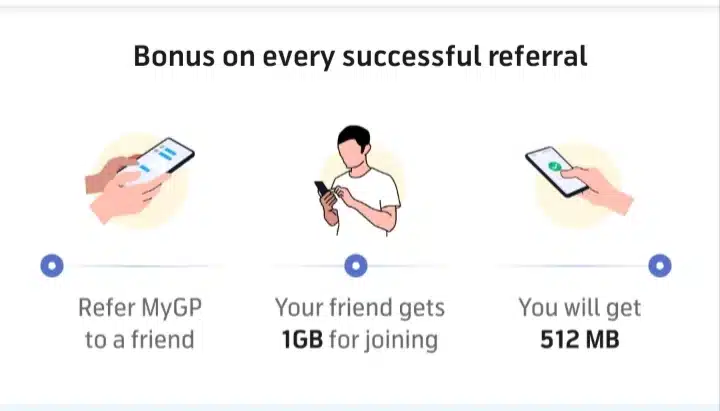
Please follow the screenshot below for guidance. If you download the MyGP App using our referral link, you may become eligible for promotional rewards based on Grameenphone’s current referral campaign.
According to the offer shown in the screenshot:
- You will receive: 1 GB Bonus Internet (if the referral offer is active and you meet the eligibility requirements).
- We will receive: 512 MB Bonus Internet as the referral reward.
Note: Referral rewards and bonus offers may change or expire at any time based on Grameenphone’s promotional terms and conditions.
Important Notice
If you download the MyGP App using our referral link, you may receive 1 GB of bonus internet as a welcome reward, provided the referral campaign is active and you meet Grameenphone’s eligibility requirements.
We recommend using the referral link below to enjoy this bonus offer. Please note that the availability of the 1 GB bonus depends on Grameenphone’s current promotional terms and conditions.
FAQ: Will You Really Receive the 1 GB Bonus?
Answer: Yes, you may receive the 1 GB bonus internet if you download the MyGP App using our referral link, provided the referral campaign is active and your account meets Grameenphone’s eligibility requirements.
To increase your chances of receiving the welcome bonus, make sure you install the app through the referral link shared in this article instead of downloading it directly from the app store.
Why Download the MyGP App Using Our Referral Link?
We only share official referral links and do not promote fake or misleading offers. If the referral campaign is active, downloading the MyGP App through our referral link may make you eligible for the promotional 1 GB bonus internet.
If you install the app directly from the Google Play Store or Apple App Store without using the referral link, you may not qualify for the referral bonus. That’s why we’ve included our referral link above for your convenience.
Note: Bonus offers and referral rewards are controlled by Grameenphone and may change or end at any time.
Final Words
We hope this guide has helped you understand how to download the MyGP App and how to transfer points easily. By following the steps explained above, you can send your reward points to your friends without any difficulty.
If you found this article helpful, please leave a comment and share it with your friends. Your support motivates us to create more useful guides and tutorials.
Thank you for visiting Priyo Blog. Stay connected for more helpful tips and updates!







Leave a Comment